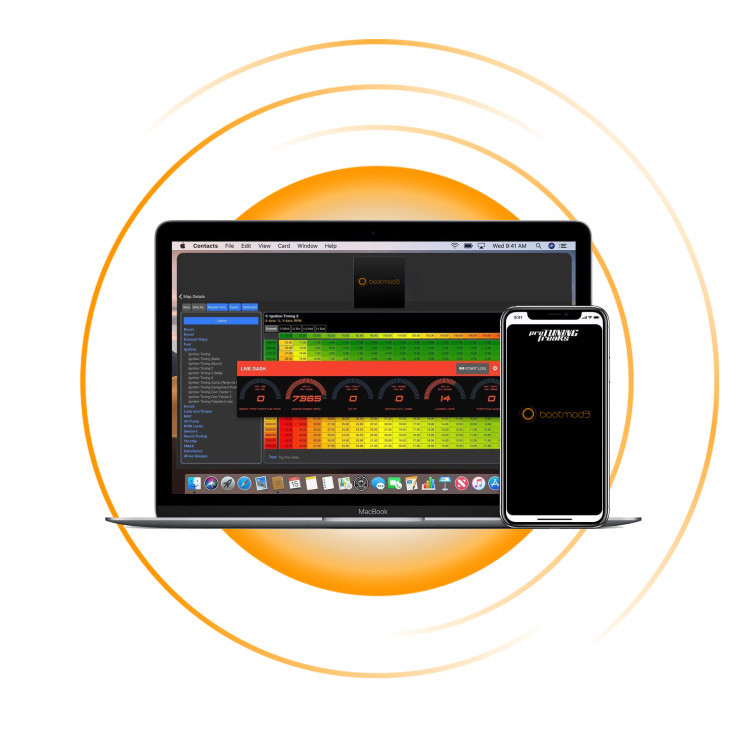
Pro Tuning Freaks have been working tirelessly since late 2015 to create a truly unique cloud based performance flash tuning platform offering benefits both end users and tuners in ways prior unimaginable! bootmod3 is a full custom tuning platform for the factory engine computer (DME) available for Windows, macOS and mobile apps for iOS and Android. Users can change their tunes through the OBD port in their own driveway using the web or mobile apps taking just seconds to do so.
UNLOCK THE TUNING POTENTIAL OF YOUR B58-POWERED BMW WITH BOOTMOD3
bootmod3 is a complete ECU/DME tuning platform for supported BMW B58-powered F-Series and G-Series models, including the M140i, M240i, 340i, M340i, 440i, M440i, 540i, 840i, X3 M40i, X4 M40i, X5 40i, X6 40i and Z4 M40i, along with a wide range of other compatible B58 applications and the Toyota GR Supra.
Once your vehicle has the required DME tuning access, bootmod3 allows you to flash compatible tuning maps yourself through the OBDII port using your phone, tablet or computer — without needing to return to a workshop or tuner every time you want to change or update your map.
Choose from ready-to-use Stage 1 and Stage 2 OTS maps, move to custom tuning as your vehicle develops, datalog, monitor vehicle parameters, run diagnostics and access advanced CustomROM features, all through the bootmod3 platform.
Our SouthernBM package allows you to put together everything you need in one place, including your bootmod3 software license, optional OTS Maps Bundle, connection hardware and the appropriate DME Bench Unlock (if required).
Not sure what your vehicle needs? Send us your Vehicle Identification Number (VIN) before ordering and we can help you select the correct package.
BUILD YOUR BOOTMOD3 PACKAGE
Select the options you need for your vehicle when placing your order.
bootmod3 Software License
The license activates bootmod3 for your vehicle and is linked to its Vehicle Identification Number (VIN). It provides access to the bootmod3 tuning platform, flashing functionality, maps, datalogging, diagnostics and other supported features.
Every bootmod3 license includes one paid OTS map of your choice, together with any maps shown as FREE for your vehicle.
OTS Maps Bundle
The optional OTS Maps Bundle gives you unlimited access to all OTS maps available in the bootmod3 OTS Maps screen for your vehicle, making it useful if you want to change between different fuel types, stages or hardware configurations.
Connection Method / Accessories
To connect bootmod3 to your vehicle, you will need either a bootmod3 Wireless OBDII Wi-Fi Adapter or a compatible BMW ENET / OBDII Ethernet cable.
If using an ENET cable, optional USB or USB-C adapters are available depending on the device you are connecting with.
If you already own compatible connection hardware, you do not need to purchase another adapter. Bootmod3 currently supports wireless and wired connection methods.
DME Bench Unlock
Some B58-powered BMW models require a DME Bench Unlock before bootmod3 tuning.
Earlier vehicles may not require an unlock, while Pre-06/2020 vehicles with November 2019+ BMW software may require our Pre-06/2020 Bench Unlock. Supported vehicles produced from 06/2020 onwards require the newer DME8 Bench Unlock.
SouthernBM offers both our Pre-06/2020 DME/ECU Bench Unlock and 06/2020+ DME8/DDE8 Bench Unlock solutions, with the correct option depending on the DME fitted to your vehicle. If your vehicle does not require an unlock, simply select Bench Unlock Not Required when building your package.
WHAT IS BOOTMOD3?
World's First, Most Advanced and Widely Adopted cloud-based flash tuning platform for the BMW F and G series vehicles!
bootmod3 is a software-based tuning platform developed specifically to communicate with the factory BMW engine control unit, commonly referred to as the DME or ECU.
Rather than replacing the factory ECU or adding a piggyback controller, bootmod3 modifies the calibration contained within the original DME.
Once your vehicle has the required tuning access, maps can be selected and flashed using the bootmod3 app through the vehicle's diagnostic port.
bootmod3 supports iOS, Android, Windows and macOS, giving owners the ability to manage their tune from a mobile device or computer.
WHAT CAN BOOTMOD3 DO?
bootmod3 is much more than a one-time ECU tune.
Depending on the vehicle, map and software configuration, the platform can provide:
Stage 1 and Stage 2 OTS tuning maps
Compatible custom ECU tuning
OBDII map flashing and reflashing
High-speed datalogging
Live vehicle monitoring through Live Dash
Diagnostics and fault-code reading/clearing
Map configuration and supported vehicle-specific adjustments
Ability to return to the factory Stock Tune
Ability to relock the DME where supported
Advanced CustomROM functionality on compatible vehicles
The bootmod3 license can continue to be used as your vehicle’s setup develops — for example, moving from a standard Stage 1 configuration to upgraded hardware or a custom tune later.
bootmod3 officially includes OBD flashing, datalogging, Live Dash, diagnostics, stock-map restoration and custom tuning support within its platform.
B58 OTS MAP PERFORMANCE
bootmod3 offers a range of Off-The-Shelf (OTS) tuning maps developed for different fuel types, vehicle configurations and stages of modification.
The current B58 OTS map gains are:
Stage 1 ACN91 Octane Up to +14% Horsepower / +22% Torque
Stage 1 91 Octane Up to +18% Horsepower / +26% Torque Stage 1 93 Octane Up to +20% Horsepower / +26% Torque Stage 1 E30 Up to +25% Horsepower / +30% Torque
Stage 2 ACN91 Octane Up to +19% Horsepower / +28% Torque Stage 2 91 Octane Up to +24% Horsepower / +32% Torque Stage 2 93 Octane Up to +26% Horsepower / +32% Torque Stage 2 E30 Up to +30% Horsepower / +35% Torque Stage 2 Racegas Up to +30% Horsepower / +35% Torque
Stage 2+ 91 Octane Up to +29% Horsepower / +42% Torque Stage 2+ 93 Octane Up to +43% Horsepower / +52% Torque Stage 2+ E30 Up to +47% Horsepower / +68% Torque Stage 2+ E50 Up to +50% Horsepower / +72% Torque
The current B58-D (2020+ G20 M340i, X3 M40i, etc) OTS map gains are:
Stage 1 91 Octane Up to +18% Horsepower / +28% Torque Stage 1 93 Octane Up to +21% Horsepower / +30% Torque Stage 1 E30 Up to +28% Horsepower / +34% Torque
Stage 2 91 Octane Up to +22% Horsepower / +33% Torque Stage 2 93 Octane Up to +25% Horsepower / +35% Torque Stage 2 E30 Up to +31% Horsepower / +38% Torque Stage 2 E50 Up to +36% Horsepower / +40% Torque Stage 2 Racegas Up to +36% Horsepower / +40% Torque
The current B58H-T0 (48V Mild-Hybrid) OTS map gains are:
Stage 1 ACN91 Octane Up to +30% Horsepower / +17% Torque Stage 1 91 Octane Up to +34% Horsepower / +19% Torque Stage 1 93 Octane Up to +36% Horsepower / +19% Torque Stage 1 E30 Up to +39% Horsepower / +20% Torque
Stage 2 ACN91 Octane Up to +34% Horsepower / +18% Torque Stage 2 91 Octane Up to +36% Horsepower / +20% Torque Stage 2 93 Octane Up to +38% Horsepower / +20% Torque Stage 2 E30 Up to +41% Horsepower / +22% Torque
These performance figures should not be treated as guaranteed results for every B58-powered vehicle. Actual output will vary depending on the model, fuel quality, hardware, condition of the vehicle, selected map and testing method.
For Australian customers, bootmod3's 91 Octane maps broadly correspond with 95 RON fuel, while its 93 Octane maps are generally intended for higher-octane fuel such as 98 RON. Always select the map recommended for the fuel being used.
WHAT'S INCLUDED WITH MY BOOTMOD3 LICENSE?
Your bootmod3 software license includes:
One paid OTS map of your choice
Access to applicable maps labelled FREE
Access to the bootmod3 app and vehicle interface
OBDII flashing and reflashing functionality
Datalogging and cloud-based log storage
Live Dash vehicle monitoring
Vehicle diagnostics
Fault-code reading and clearing
Stock Tune backup and restoration
Ability to use compatible custom tunes
A license is linked to one Vehicle Identification Number (VIN).
If you want access to the complete selection of OTS maps shown for your vehicle, add the OTS Maps Bundle when ordering.
WHAT DO I NEED TO GET STARTED?
There are three things to consider before you can tune your vehicle with bootmod3.
1. A bootmod3 License
The bootmod3 License activates the tuning platform for your vehicle and includes one OTS map. You can also add the optional OTS Maps Bundle for access to the full range of compatible OTS maps available for your vehicle.
2. A Connection To The Vehicle
You'll need either the bootmod3 Wireless OBDII Wi-Fi Adapter or a compatible ENET cable so the bootmod3 app can communicate with the DME. If using an ENET cable, USB or USB-C adapters are also available depending on the device you're connecting with.
3. An Unlocked DME
Some B58 models require a DME Bench Unlock before bootmod3 tuning. Whether an unlock is required, and which type is needed, depends on the vehicle's production date and DME software. Separate Pre-06/2020 and 06/2020+ unlock options are available as part of the SouthernBM package.
DOES MY DME NEED TO BE UNLOCKED?
Not necessarily. Unlike some BMW engine platforms, not every B58-powered vehicle requires a DME Bench Unlock before bootmod3 tuning.
The unlock requirement depends on the DME, production date and BMW software version fitted to the vehicle.
B58 Vehicles Before 06/2020
Earlier B58 vehicles with compatible DME software can be tuned through the OBDII port without a Bench Unlock.
Most B58 models produced before June 2020 and with November 2019+ BMW software require the traditional Pre-06/2020 DME/ECU Bench Unlock.
SouthernBM can complete this service locally. You can book the complete vehicle into our Moorabbin workshop, bring us the removed DME, or mail the removed DME to us for unlocking.
Once completed, the DME can be reinstalled and compatible bootmod3 tuning can be carried out through the OBDII port.
If you're unsure whether your vehicle requires a DME Bench Unlock, or which type of unlock is required, you can check this directly through the bootmod3 app before purchasing a bootmod3 license.
Simply connect to the vehicle using a compatible ENET cable or bootmod3 Wireless OBDII Wi-Fi Adapter and view the vehicle's Software IDs within the bootmod3 app. The app will display the DME information and indicate whether an OBD Unlock or Bench Unlock is required.
If a Bench Unlock is required, the DME information shown in bootmod3 can also help identify the correct unlock type for the vehicle.
A bootmod3 software license is not required to perform this check.
If you're still unsure, send us your VIN together with a screenshot of the bootmod3 DME information and we can help confirm whether an unlock is required and which option is suitable.
HOW DO I USE BOOTMOD3?
Once your vehicle has the required DME access, using bootmod3 is straightforward.
Step 1 — Install The bootmod3 App
Create or sign into your bootmod3 account using a compatible mobile device or computer.
Step 2 — Connect To Your Vehicle
Connect the bootmod3 Wi-Fi Adapter or compatible ENET connection to the vehicle's OBDII port.
Turn the vehicle ignition on with the engine off and follow the instructions within the bootmod3 app. We recommend using a suitable battery charger during flashing.
Step 3 — Activate Your License
Activate the bootmod3 software license against your vehicle's VIN. The app will identify vehicle and DME information.
Step 4 — Choose Your Map
Select an appropriate OTS map for your vehicle, fuel and installed hardware, or use a compatible custom tune.
Step 5 — Flash The Vehicle
Follow the on-screen instructions to flash your selected calibration to the DME.
Once any required unlock and initial setup have been completed, supported map flashing is carried out through the OBDII port. Flashing typically takes only a few minutes to complete.
KEY BOOTMOD3 FEATURES
More than just a tune — bootmod3 gives you the tools to flash, monitor and manage your vehicle.
OBDII Flashing
Flash supported tuning maps through the vehicle's diagnostic port without removing the DME.
OTS & Custom Tuning
Choose from bootmod3's ready-made OTS maps or work with a compatible tuner to develop a custom calibration.
Datalogging
Record engine and DME parameters to analyse vehicle performance and assist with tuning.
Live Dash
Display live engine and vehicle data through configurable gauges inside the bootmod3 app.
Diagnostics
Read and clear vehicle fault codes and access supported diagnostic functionality directly through bootmod3.
Map Configuration
Compatible maps provide access to configurable features including exhaust burble settings, exhaust flap behaviour, cooling strategies, boost-by-gear settings and other vehicle-specific options.
Return To Stock
Your original factory calibration is available as the Stock Tune, allowing the DME to be returned to standard programming where required.
BOOTMOD3 CUSTOMROM V2
For customers looking to go beyond conventional Stage 1 or Stage 2 tuning, supported B58 vehicles can also access advanced bootmod3 CustomROM V2 functionality.
Current B58 CustomROM V2 features include capabilities such as:
On-the-fly Map Switching with up to four calibration slots
Flex Fuel tuning
Anti-Lag
Advanced Map Editor functionality
High-speed datalogging
Ethanol content display
Transmission torque-limiter functionality on supported applications
CustomROM V2 and individual feature availability depend on the vehicle, DME software, and tuning configuration.
SUPPORTED BMW B58 MODELS
This package is designed for supported BMW vehicles equipped with the B58 engine.
2016-2019 BMW F20 M140i Hatch
2016-2021 BMW F22 M240i Coupe
2016-2021 BMW F23 M240i Convertible
2020-present BMW G42 M240i Coupe incl. xDrive
2016-2019 BMW F30 340i Sedan
2016-2019 BMW F31 340i Touring
2019-present BMW G20 M340i Sedan incl. xDrive
2019-present BMW G21 M340i Touring incl. xDrive
2016-2020 BMW F32 440i Coupe
2016-2020 BMW F33 440i Convertible
2016-2020 BMW F36 440i Gran Coupe
2020-present BMW G22 M440i Coupe incl. xDrive
2020-present BMW G23 M440i Convertible incl. xDrive
2020-present BMW G26 M440i Gran Coupe incl. xDrive
2017-2023 BMW G30 540i Sedan
2017-2023 BMW G31 540i Touring
2017-2023 BMW G32 640i Gran Turismo
2016-2022 BMW G11 740i Sedan
2016-2022 BMW G12 740Li Sedan
2019-present BMW G14 840i Convertible
2019-present BMW G15 840i Coupe
2019-present BMW G16 840i Gran Coupe
2017-2024 BMW G01 X3 xDrive M40i
2017-2025 BMW G02 X4 xDrive M40i
2019-present BMW G05 X5 40i
2019-present BMW G06 X6 40i
2019-present BMW G07 X7 40i
2019-2023 BMW G05 X5 45e
2018-present BMW G29 Z4 M40i
2018-present Toyota GR Supra
If your model or variant isn't listed, contact uswith your Vehicle Identification Number (VIN) before ordering.
CAN SOUTHERNBM SET UP AND INSTALL BOOTMOD3 FOR ME?
If you’d prefer not to set bootmod3 up yourself, SouthernBM can assist with the complete process at our Moorabbin workshop (Melbourne only).
Depending on your vehicle and selected package, we can take care of the DME removal and Bench Unlock where required, bootmod3 setup and license activation, connection to the vehicle, initial setup and the map flash.
Additional labour charges apply depending on the vehicle and work required. Contact us to arrange a booking.
CAN I TRANSFER MY BOOTMOD3 LICENSE?
Yes, provided bootmod3's license-transfer requirements are met.
License transfers are available to the original purchaser and may be completed once only. Before transferring the license, the original vehicle must be returned to the Stock Tune and the DME must be relocked using the bootmod3 app.
Previously purchased OTS Maps Bundles, individual OTS maps and custom maps do not transfer with the license.
Always check the current bootmod3 license-transfer terms before selling or transferring your license.
FLASHING BACK TO STOCK AND LOCKING THE DME WITH ANY OTHER FLASH TOOLS WILL NOT BE ACCEPTED.
FREQUENTLY ASKED QUESTIONS
Can I Tune My BMW Myself At Home?
Yes. Once any required DME Bench Unlock has been completed, bootmod3 allows supported maps to be managed and flashed through the OBDII port using compatible connection hardware.
You do not need to return to a tuner each time you want to flash or change a supported map.
Does bootmod3 Include A Tune?
Yes. A bootmod3 software license includes one paid OTS map of your choice, together with any applicable maps marked FREE.
Do I Need The OTS Maps Bundle?
Not necessarily. If you only require one OTS map, the map included with your bootmod3 license may be all you need.
The OTS Maps Bundle is useful if you want access to the full selection of OTS maps available for your vehicle so you can change between different stages, fuels or hardware configurations.
Does The bootmod3 License Include A DME Unlock?
No. The bootmod3 software license and the physical DME Bench Unlock are separate services.
If your vehicle requires an unlock, select the appropriate unlock option when building your SouthernBM package.
What Devices Can I Use With bootmod3?
bootmod3 can be used with compatible iPhone, iPad, Android, Windows and macOS devices, giving you the flexibility to manage and flash your vehicle from a phone, tablet or computer.
Depending on the device you are using, you'll need either the bootmod3 Wireless OBDII Wi-Fi Adapter or a compatible ENET cable, with a USB or USB-C adapter where required.
For the best compatibility, we recommend keeping your device and the bootmod3 app updated to the latest available software version.
Does Every B58 Need A Bench Unlock?
No. Earlier B58 vehicles with compatible DME software can be tuned without a Bench Unlock.
Pre-06/2020 vehicles with November 2019+ BMW software may require the Pre-06/2020 Bench Unlock, while supported B58 models produced from 06/2020 onwards require the 06/2020+ DME8 Bench Unlock.
If you're unsure which one applies to your vehicle, send us your Vehicle Identification Number (VIN) and we can help confirm the correct option.
Does A DME Unlock Increase Power?
No. The unlock only enables tuning access. Any increase in performance comes from the tuning calibration subsequently flashed with bootmod3.
Which OTS Map Should I Choose?
Choose an OTS map that matches your vehicle, fuel and installed hardware. Each map has specific requirements, so these should always be checked before flashing.
If you're unsure which Stage 1, Stage 2 or fuel-specific map is suitable for your vehicle, contact us before proceeding.
Can I Flash Different Maps Later?
Yes. One of the major advantages of bootmod3 is the ability to manage and flash compatible maps through the OBDII port once the vehicle has the required tuning access.
Can I Return The Vehicle To Stock?
Yes. bootmod3 creates and provides access to the vehicle's Stock Tune and includes functionality to flash the vehicle back to its factory calibration.
Do I Need To Keep The Wi-Fi Adapter Connected?
No. The connection hardware is required when communicating with bootmod3 for functions such as flashing, datalogging, diagnostics and Live Dash. It does not need to remain connected for normal driving.
Can A BMW Software Update Affect My Tune Or DME Unlock?
Yes. BMW software programming can change the DME software or tuning access. If your vehicle is going to receive a dealer software update, contact usbeforehand where possible so we can advise you on any potential tuning or unlock requirements afterwards.
IMPORTANT INFORMATION BEFORE YOU PURCHASE
Please ensure bootmod3 and the selected options are suitable for your vehicle before ordering.
bootmod3 software licenses and other digital activation products are non-refundable once issued or activated in accordance with the applicable software terms.
Aftermarket ECU tuning may affect manufacturer warranty coverage and may also affect emissions or road-use compliance. Customers are responsible for ensuring their vehicle and selected modifications comply with applicable laws and regulations.
If you're unsure about compatibility, DME unlocking, map selection or the hardware required for your vehicle, contact us with your Vehicle Identification Number (VIN) before placing your order.
VEHICLE MANUFACTURER WARRANTY AND EMISSIONS DISCLAIMER
Some items used and/or installed by PRO TUNING FREAKS may void portions of your vehicle’s factory warranty. Some items may not be legal for “on highway use”. PRO TUNING FREAKS makes no guarantees to the legality of any parts used for “on highway vehicles” and accepts no responsibility for compliance with the vehicle’s factory warranty.
Models
1 Series
F20 (2012-2019):
M140i
2 Series
F22 / F23 (2014-2021):
M240i
G42 (2021+):
M240i / M240i xDrive
3 Series
F30 / F31 / F34 (2012-2018):
340i
G20 / G21 (2019+):
M340i / M340i xDrive
4 Series
F32 / F33 / F36 (2014-2020):
440i
G22 / G23 / G26 (2020+):
M440i / M440i xDrive
5 Series
G30 / G31 (2017+):
540i
6 Series
G32 (2017+):
640i
7 Series
G11 / G12 (2016+):
740i / 740Li
8 Series
G14 / G15 / G16 (2018+):
840i
X3 Series
G01 (2018+):
X3 M40i
X4 Series
G02 (2018+):
X4 M40i
X5 Series
G05 (2019+):
X5 40i, X5 45e
X6 Series
G06 (2019+):
X6 40i
X7 Series
G07 (2019+):
X7 40i
Z Series
G29 Z4 (2018+):
Z4 M40i
Be the first to write a review
Thanks for submitting your review!
Please note, all reviews must be approved before they are published.
Items marked GREEN or 'In Stock' are currently in stock at SouthernBM. Most orders are shipped within 1-2 business days. ‘Click & Collect’ orders are usually ready within 1-2 hours during normal trading hours.
Available to Order
Items marked YELLOW or ‘Available To Order’ are not currently in stock at SouthernBM, and need to be ordered in from the supplier. Please note the expected delivery time before placing an order.
No Longer Available
Items marked RED or ‘No Longer Available’ have been discontinued and are no longer available to be ordered. Please contact us for an alternative.
All orders are dispatched from our Melbourne warehouse. Most orders are delivered within 1-3 business days Australia-wide after dispatch. The expected delivery time on all 'Available To Order' items is only an estimate and wait times may vary from those provided. Please contact us if you have any questions.
All items listed on our website are not available for in store pick up without prior purchase. Please use the ‘Click & Collect’ option at checkout and we will let you know as soon as your order is ready.
Make a booking
Thanks! We've received your request. We will be in touch within 1 business day to confirm your booking. If you do not see the email in this time, please check your JUNK/SPAM folder.
Preferred Date
Drop Off Time
Vehicle
Registration #
First Name
Last Name
Email Address
Keep me updated with news and exclusive offers
Phone
Referral Code (Optional)
If you've been given a referral code through one of our events, partners, or social media collaborators, please enter it here. This field is optional and is not required to complete your booking.
How can we help?
Send Request
By clicking the Send button, you acknowledge that this form is a request for service and not a confirmation.